Tools vs skills vs MCP: how agents acquire capabilities
Tools, skills, and MCP are the three ways an agent acquires capabilities. The terms get used interchangeably, but they name three different things. A tool is not a skill. A skill is not just a prompt. And MCP, despite how people talk about it, is not a capability at all: it is a protocol. In this post I want to walk through the three layers from the bottom up, show how they behave together in a running session, and end with a short set of rules for picking the right one.
Tools are primitives
A tool is a function the model can call, and that’s the whole definition: read a file, edit a file, run a bash command, search the codebase, fetch a URL. Strip away everything else and a tool is just code the model is allowed to invoke.
“Code the model can invoke” needs guardrails, so three properties define the layer:
- A schema. The model can’t call a function it can’t describe, so every tool declares a name, a description, and an input schema. The schema is the contract: the model fills in arguments, the harness validates them, the handler runs.
- A registry. With more than a handful of tools, the harness needs one table of everything callable: what is available, what permission each entry needs, and how calls get dispatched.
- Permissions. You don’t want an agent running arbitrary actions unchecked, so each tool declares the minimum access it needs and the harness enforces that at dispatch time, before anything runs.
Tools are universal. Every coding agent needs read, edit, and bash, which is why every harness ships them as built-ins. They change rarely, and adding one means writing real code with error handling and tests. Tools are component three of the nine I covered in the harness essay. What tools do not carry is knowledge about your team, your deploy process, or your conventions. That knowledge lives in the next layer up.
Skills: knowledge about the tools you already have
A skill is know-how, not an action. Say your agent has all the right tools but keeps deploying the wrong way. The missing piece isn’t a new function. A skill sits on top of tools, adds no new actions, and encodes how and when to use the actions the agent already has. In its simplest form, a skill is a document.
Anthropic’s agent skills are the most developed version of the idea. In their words: “Skills are folders that include instructions, scripts, and resources that Claude can load when needed.” A folder, a SKILL.md file, optional scripts and references. The catch with any knowledge layer is context cost, so the format solves for that: the harness scans the available skills during a task and loads only the ones that match, which means a large library costs almost no context. Anthropic shipped the feature in October 2025 and published the format as an open standard that December.
In practice you’ll meet two kinds:
- Built-in. Every harness ships a baseline: how to make a git commit, open a pull request, run the tests and read the results.
- User-added. These encode your team: the deploy procedure, the review checklist, the way your migrations work.
The economics are why the second kind matters. A new tool is a software project. A new skill is a document. If you can write a runbook, you can write a skill, and that’s the fastest path from “the agent uses our stack wrong” to “the agent uses it our way.”
A close cousin is AGENTS.md, “a README for agents,” now in over 60,000 open-source repositories. Same idea, knowledge as markdown, but different scope: AGENTS.md is project context the harness loads every session, while a skill is a procedure pulled in on demand.
MCP: a connector, not a capability
MCP is the most misfiled of the three. It is not a tool and it is not a skill. The Model Context Protocol describes itself as “an open-source standard for connecting AI applications to external systems,” and its own analogy is the right one: MCP is like a USB-C port. A standardized connector, not a device. Reduced to its floor, MCP is a wire format for tools that live in another process.
The mechanics, briefly:
- The harness acts as an MCP host and opens one client connection per server.
- A server exposes tools, plus resources (data) and prompts (templates), over JSON-RPC.
- The harness calls
tools/listto discover what a server offers andtools/callto execute. - Servers run locally over stdio or remotely over HTTP.
Why bother with a protocol at all? Without a standard, every harness needs its own GitHub integration, its own database integration, its own browser integration: N harnesses times M systems, and that multiplication is the pain MCP removes. With it, someone writes one GitHub server and it works in Claude Code, VS Code, Cursor, ChatGPT, and anything else that speaks the protocol. Build once, connect everywhere.
How the three fit together
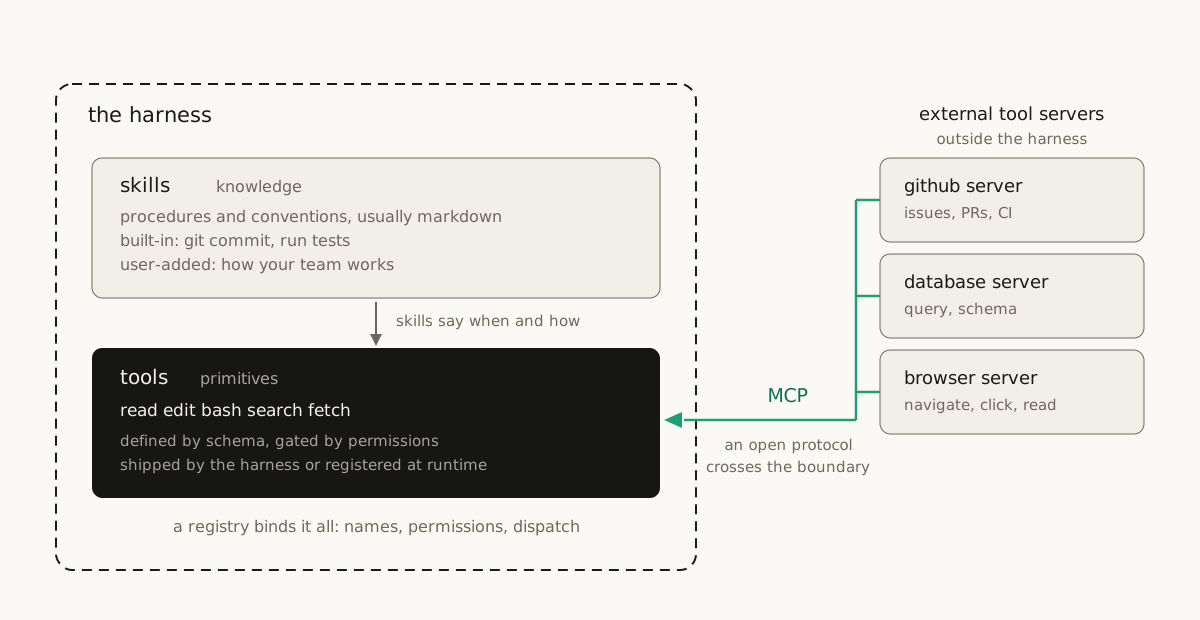
In a real session the layers compose, and the picture above is the whole story:
- An MCP server exposes tools. The harness discovers them at connection time and merges them into the same registry as the built-ins, so a remote tool ends up sitting next to
readandbashin one table. - Skills say when and how. A database skill might tell the agent to query the read replica, never production, and to check the schema resource before writing SQL. The skill steers; the tools act.
- The registry and permissions govern everything. A tool that arrived over MCP passes the same permission checks, the same hooks, and the same approval prompts as a tool the harness shipped.
To the model, none of this structure is visible. It sees one flat list of callable things. The taxonomy exists for the people building and securing the system, not for the agent using it. That is also why the terms blur so easily in conversation.
Common confusions
- “MCP replaces tools.” No. MCP transports tools. The tool is still a schema-defined function; the protocol just moved its definition and execution to another process. Every MCP tool ends its journey as an ordinary entry in the harness registry.
- “Skills are just prompts.” Partly. The model does read them as text. But a skill is a versioned artifact with conventions: a folder, a manifest, a trigger description, optional scripts. It lives in a repo, gets diffed and reviewed, and loads on demand instead of sitting in every context window.
- “An MCP server is an agent.” No. A server has no loop and no model. It sits and waits for
tools/call. The agency stays in the harness. - “Skills and AGENTS.md are the same thing.” Cousins, not twins. AGENTS.md is always-on project context. A skill is an on-demand procedure. You want both, for different jobs.
So which one do you need?
- The agent cannot perform an action at all: write a tool.
- The capability lives in an external system, or you want it in more than one harness: stand up or install an MCP server.
- The agent has the right tools but uses them wrong, or does not know your conventions: write a skill.
- Every session in this repo needs the same context: put it in AGENTS.md.
- You need to enforce a rule rather than suggest it: that is permissions and hooks, not any of the three.
More capability means more attack surface
Every capability you add has a security cost. Each mechanism widens what the agent can do, which widens what an attacker can do through the agent.
Tools are the most contained: code you wrote or vetted, behind schema validation and permission checks. Skills are instructions the model will follow, so a malicious or sloppy skill is prompt injection with a version number. One audit found that one in four community-contributed agent skills contains a vulnerability. I covered that finding in the harness engineering essay. MCP imports both risks at once: you are running someone else’s code or trusting someone else’s server, and its tool descriptions flow straight into your context.
The defenses live in the harness, not in the capability layers themselves: one registry, permission checks at dispatch, hooks that can deny a call before it runs. And treat third-party skills and servers the way you treat dependencies. Read them before you install them, pin what you can, and grant the least access that still does the job.
Sources
- Model Context Protocol, the official site, and its architecture overview
- Agent skills, Anthropic’s announcement, later published as an open standard
- AGENTS.md, the README-for-agents convention
- What is an agent harness? The nine components of a great one, the companion essay on this site
- Harness engineering: why agent performance now lives outside the model, where the one-in-four skills audit appears