What is an agent harness? The nine components of a great one
An agent harness is the fixed architecture that turns a model into an agent. A language model on its own can only do one thing: read text and produce more text. Yet you type a single sentence into Claude Code and it edits files, runs commands, searches the web, and asks your permission before it does anything risky. The thing doing all of that is not the model. It is the layer wrapped around the model, and that layer is the harness. If you’re building agentic systems, this is the piece that deserves most of your attention. In this post I want to explain what a harness is, how it differs from a framework, the nine components a modern one needs, and how a minimal version fits together in Python.
What a harness is
A harness is a fixed architecture that turns a model into an agent.
The definition makes sense once you see the gap it fills. An LLM by itself is a one-shot text generator. You ask a question, it answers, and it stops. There is no second step. The harness is what gives the model the ability to take an action, see the result, and keep going until the task is done. The model is the engine. The harness is the car. Together they make an agent.
The clearest examples are the agentic coding tools: Claude Code, Codex, Cursor, Windsurf. Each one is a harness. Each started from the same concrete problem, making a model write and edit code in a real repository, and they have all converged on remarkably similar architectures. That convergence is a hint that there is a common shape here worth learning.
A harness is not a framework
People use these two terms interchangeably, and it causes real confusion, so let’s separate them.
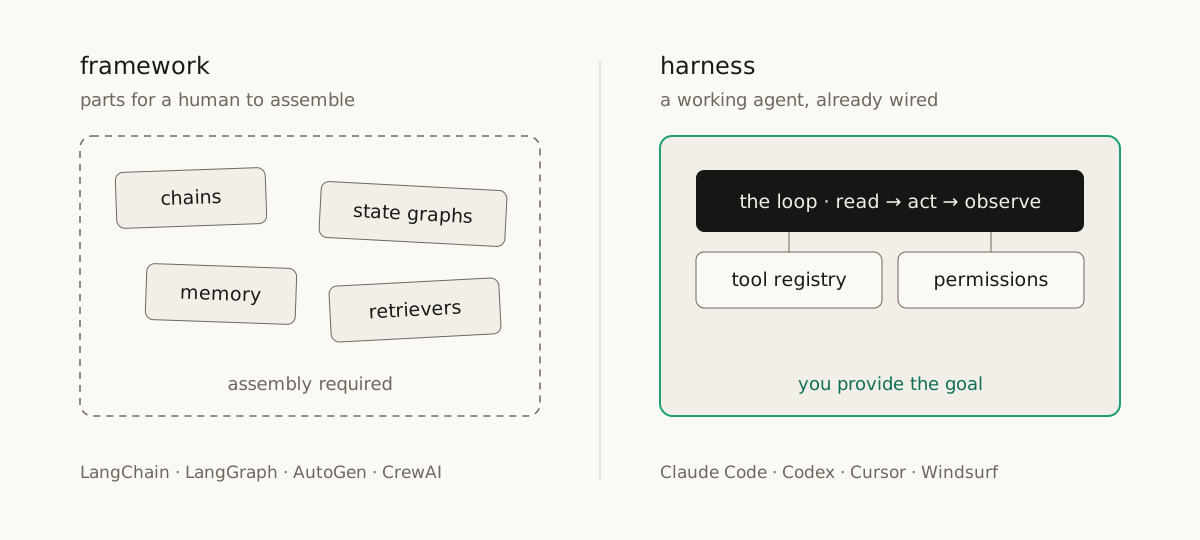
LangChain, LangGraph, AutoGen, and CrewAI are frameworks. A framework gives you building blocks: chains, state graphs, memory connectors, retrievers. You, the developer, are expected to wire them together into an agent. The assembly is your job.
A harness works the other way around. There is no assembly step. It ships as a working agent: a loop, a tool registry, and a permission layer, already wired. A framework is built for a human to assemble an agent. A harness is built for the agent to do a task. You provide the goal, and the harness handles the rest.
The nine components of a modern harness
This is an opinionated list, but it works in practice, and it maps closely onto Claude Code, the best harness I know. The order matters: each component exists to fix a problem the previous one creates.
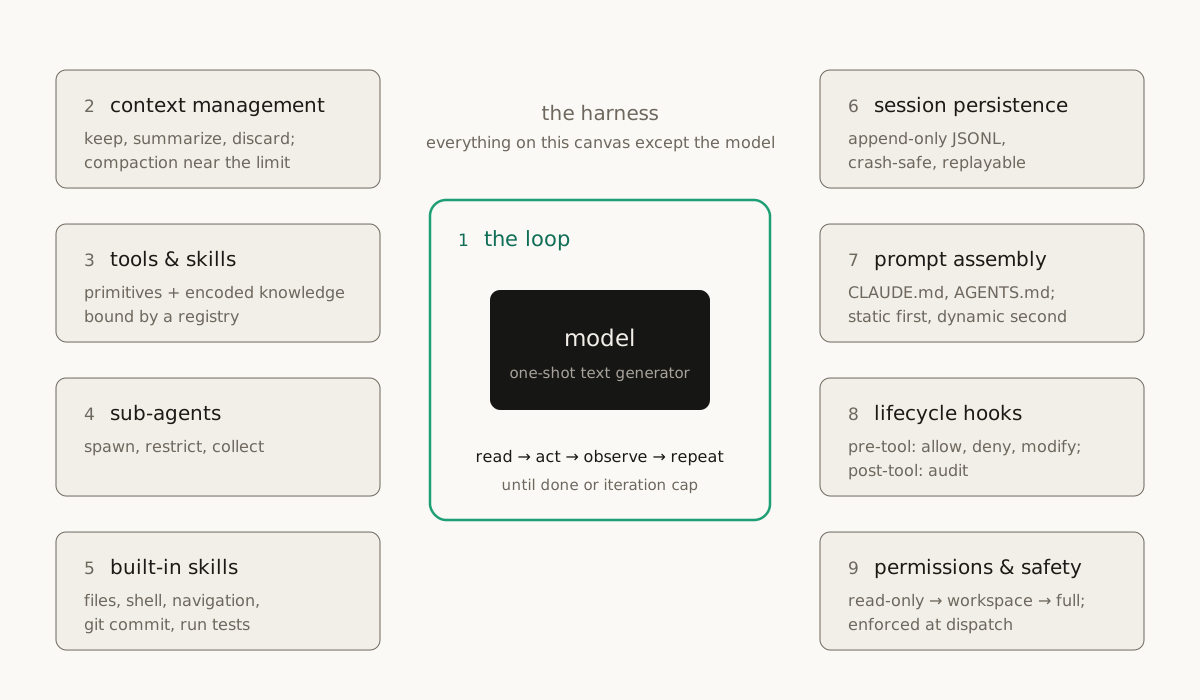
1. The loop. A harness is, at its core, a while loop. That’s the whole trick. The model reads its system prompt, decides which tool to call, the harness runs the tool and feeds the result back into context, and the cycle repeats. It stops when the model produces a text-only response or hits an iteration cap. Everything else in this list exists to support these few lines.
2. Context management. The loop creates the first problem: the transcript grows every turn, and the model’s context window doesn’t. The harness has to decide what to keep in full, what to summarize, and what to throw away. Claude Code is a good example: its budget was around 200,000 tokens (now up to a million with Opus), and when usage gets close to the threshold it triggers compaction. Recent messages stay in full. Older ones get boiled down to a summary. Compaction done badly can quietly ruin a session, because a summary that drops the wrong detail leaves the agent confidently working from a broken memory. Handle this component with care.
3. Tools and skills. The loop needs actions to choose from on each turn. Tools are the primitives: read a file, edit a file, run bash, search code. Skills sit on top of tools, and the distinction is simpler than it sounds: a skill is knowledge about how your team works, usually written down as a markdown file. Tools are universal. Skills are specific to you. A registry binds them together: it knows what is available, what permission each entry needs, and how calls get dispatched.
4. Sub-agent management. Some tasks are too big or too parallel for a single conversation thread, and stuffing them into one context makes the compaction problem from component two worse. So the harness spawns sub-agents that work in isolation. Each one gets its own session, a restricted set of tools, and a focused system prompt scoped to one task. The pattern is simple: spawn, restrict, collect.
5. Built-in skills. Every harness ships a baseline that works out of the box: file operations, shell execution, code navigation. For a coding agent these are non-negotiable. Modern harnesses also include higher-level built-ins, like how to make a git commit, open a pull request, or run the tests and read the results.
6. Session persistence. A long agent session is stateful, and if the process dies you lose everything, unless the harness writes state to disk as it goes. The modern approach is an append-only JSONL log: one line per event (every message, tool result, and compaction event), flushed to disk immediately. It’s just a file on disk. If the harness dies, the file survives, and replaying it puts you back exactly where you left off.
7. System prompt assembly. The system prompt is not a static string. It is a pipeline that walks ancestor directories, finds instruction files like CLAUDE.md or AGENTS.md, and injects them. One caution: keep the static parts first and the dynamic content second. If you reorder them, you break prefix caching and pay for it on every request.
8. Lifecycle hooks. Hooks let you add custom logic around tool execution without touching the harness itself. A pre-tool hook fires before execution and can allow, deny, or modify the call. A post-tool hook fires after and sees the output; it is there for auditing and logging. Hooks are how enterprises adopt harnesses in practice: they wrap their own policy around someone else’s agent.
9. Permissions and safety. The loop in component one runs real commands on your machine, so this layer is what makes the whole thing safe to hand a goal to. The harness defines permission modes (read-only, workspace, full access), each tool declares the minimum it needs, and the harness enforces that before anything runs. For a tool like bash, permissions are classified dynamically: listing files stays read-only, deleting files requires full access, and the harness decides by parsing the command. On top of the static rules sit interactive approvals: the agent pauses and asks before doing anything destructive.
The model generates text. These nine pieces turn that text into safe, resumable action.
Build one to understand one
The easiest way to internalize these components is to build a tiny harness yourself, because each piece is small once you see it in code. A minimal version needs:
- a main loop with an iteration cap
- simple compaction once history grows past a threshold
- a registry that maps each tool name to a small record: name, permission, handler, description
- a few sub-agent archetypes (exploration, general, verification), each with its own tool list
- crash-safe JSONL session logging
- prompt assembly that reads instruction files from disk
- pre-tool and post-tool hooks with allow and deny
- permission checks at dispatch time, with dynamic classification for bash
One design rule matters here: the built-in primitives should use the standard library only. The moment your file-read tool depends on a framework, your harness inherits that framework’s assumptions, and you lose the portability that makes harnesses valuable in the first place.
The video below walks through the full reference implementation line by line. If you want to see exactly how the pieces fit, that is the place to go.
Where this fits
The harness is not a side detail. The research now shows it drives more of an agent’s performance than the choice of model. I wrote a separate essay on that evidence: two March 2026 papers that measure what happens when you make the harness explicit and optimize it.
Sources
- Claude Code, the harness this architecture maps onto most directly
- AGENTS.md, the convention harnesses use for project instructions
- Harness engineering: why agent performance now lives outside the model, the companion research essay on this site
Watch the full walkthrough
This essay is the written companion to a video on Prompt Engineering. The video goes deeper on the visuals and the numbers.