How agent harnesses manage context: cap, slice, search, store
Context management is how an agent harness decides what the model sees on each turn. It matters because the context window is too small for everything the model might want to see, and a full window makes the agent worse. You can watch this happen: an agent works well for twenty minutes, reads one big file, and gets noticeably dumber. It repeats itself, forgets a decision it made earlier, and re-reads things it already saw. Nothing about the model changed. The window filled up, and the model stopped reasoning about the task and started swimming through its own transcript.
Modern harnesses treat context as memory that has to be managed, not as a passive chat log. In the harness anatomy essay I listed context management as component two of nine. In this post I want to go deeper: what occupies the window, the four moves harnesses make when content doesn’t fit, and how four real harnesses handle the same stress test.
What fills the window
The window holds more than the conversation. On any given turn it contains:
- Fixed context. The system prompt, tool definitions, policies, and skills. Loaded once at session start.
- Conversation history. Grows every turn, without bound.
- File contents. A single read can be ten thousand, fifty thousand, sometimes hundreds of thousands of tokens. Often the largest single occupant.
- Tool results. Grep, bash, search, database output. Every call writes another object into the transcript, so these accumulate fast.
- Sub-agent responses, summaries, and memory state. Forked task output and compaction artifacts.
Almost everything on that list grows, and the window doesn’t. All of it competes with the one budget you can’t touch: room for the model to answer.
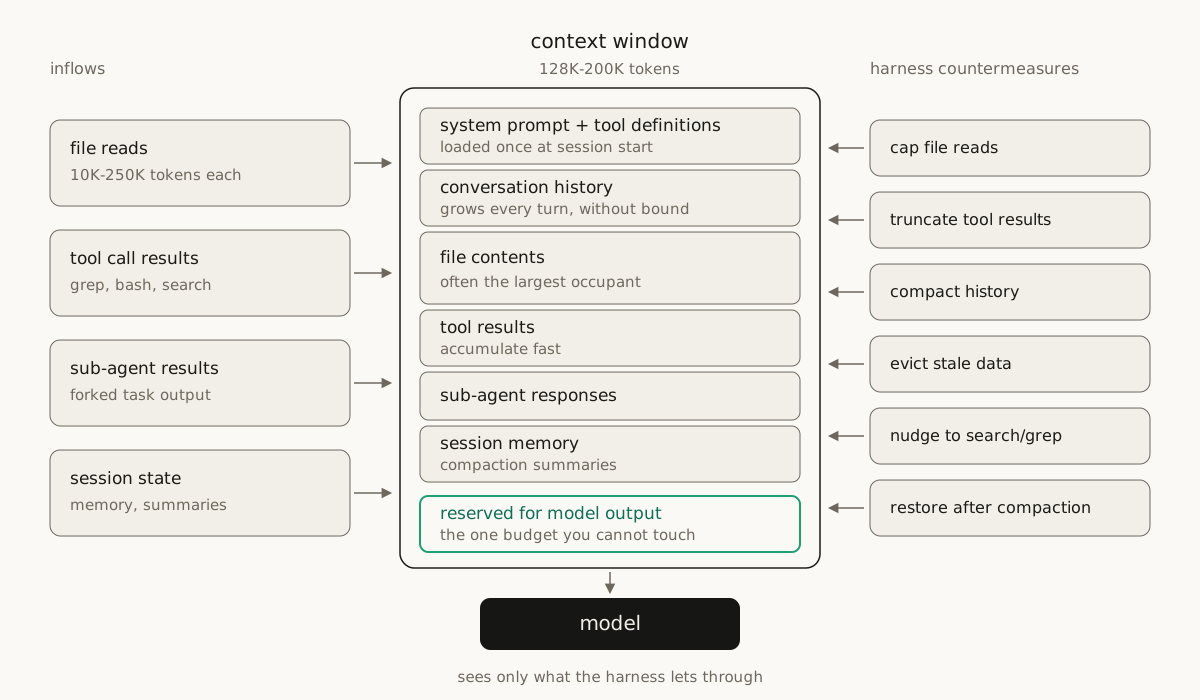
The harness ends up acting like an operating system. It decides what stays close to the model, what gets compressed, what gets paged out, and what can be retrieved later.
How harnesses handle large files
The clearest test case is a file that’s bigger than the available context. When the model asks to read one, somebody has to decide what happens, because “just read it” would evict everything else the model knows. For the research behind this post I traced that decision through four harnesses: Pi, OpenClaw, Claude Code, and Letta. None of them just reads the file. The answer is always some combination of four moves:
- Cap it. Enforce a hard limit on lines or bytes and show the head of the file.
- Slice it. Let the model page through the rest with offset and limit parameters.
- Search it. Point the model at grep or semantic search instead of a full read.
- Store it elsewhere. Keep the full content on disk or in a vector store and show only a managed view.
Each harness mixes the moves differently:
- Pi is harness-first and simple. File reads are capped at 2,000 lines or 50 KB. The model sees the beginning of the file plus an explicit continuation nudge: use offset and limit to continue.
- OpenClaw layers defense on top of the same idea. It keeps Pi-style truncation, adds character budgets for bootstrap files, caps tool results, and uses head-plus-tail truncation when the end of the output looks important.
- Claude Code is the most aggressive. It checks file size before opening. If the file is too large, the read is rejected outright and the model is pointed toward offset, limit, or grep. After a successful read it token-counts the output, truncates long lines, deduplicates repeated reads of the same file, and can tune all of these limits remotely.
- Letta takes a different path. It parses, chunks, and embeds files into a vector store. The model gets direct viewing, exact search, and semantic search, and the window only ever shows a managed view of the file.
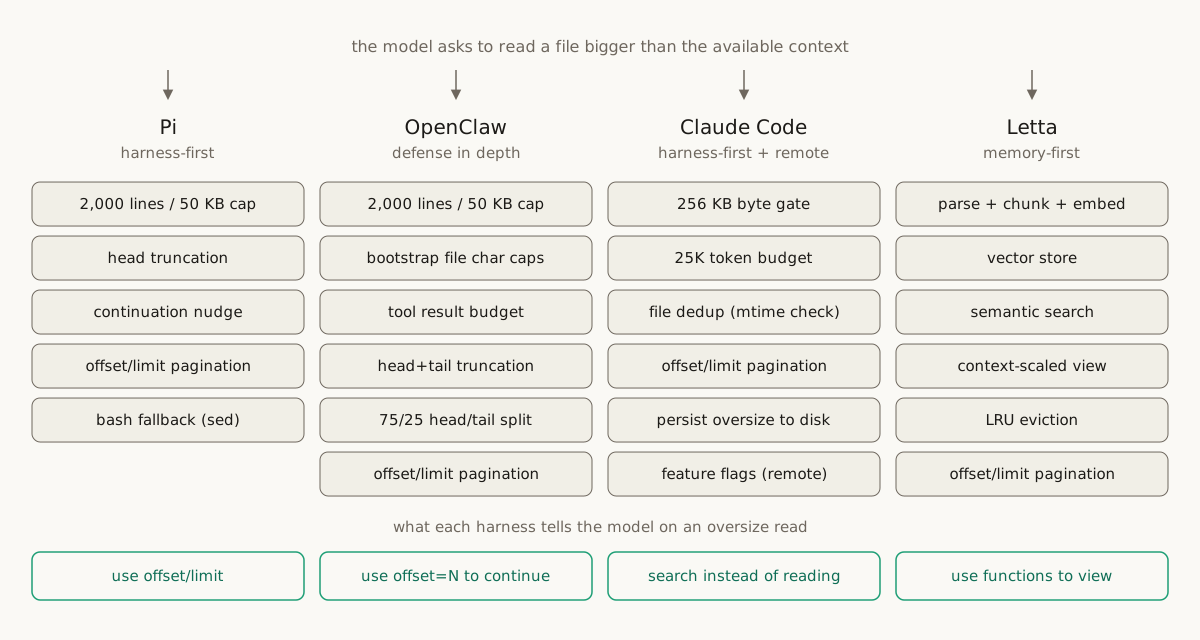
Different architectures, same lesson: file context isn’t dumped into the model, it’s mediated.
Tool results are the quiet offender
Tool results eat context in a way that’s easy to miss. A file announces itself: you know a 200 KB read is a problem the moment you see it. Tool results feel harmless because each one looks useful in isolation. One grep output is fine. One JSON payload is fine. But every call writes another object into the transcript, so a session’s worth of grep outputs, logs, and dataframe previews can eat the working set faster than the conversation itself, and no single result ever looked like the culprit.
The fix follows the same logic as the file case: stop treating tool outputs as messages and start treating them as artifacts. Oversized results get persisted to disk, and the model sees a small preview plus a pointer to the rest. Repeated previews get deduplicated. Long values get truncated head-and-tail. Search results get summarized, paginated, or capped per tool and per message. Anthropic’s context engineering guidance points the same way: treat context as a finite resource and clear raw tool outputs from history once they’ve served their purpose.
The insight underneath is that the model doesn’t need the entire payload in the prompt. It needs enough visible state to decide what to fetch next.
Old history gets compacted
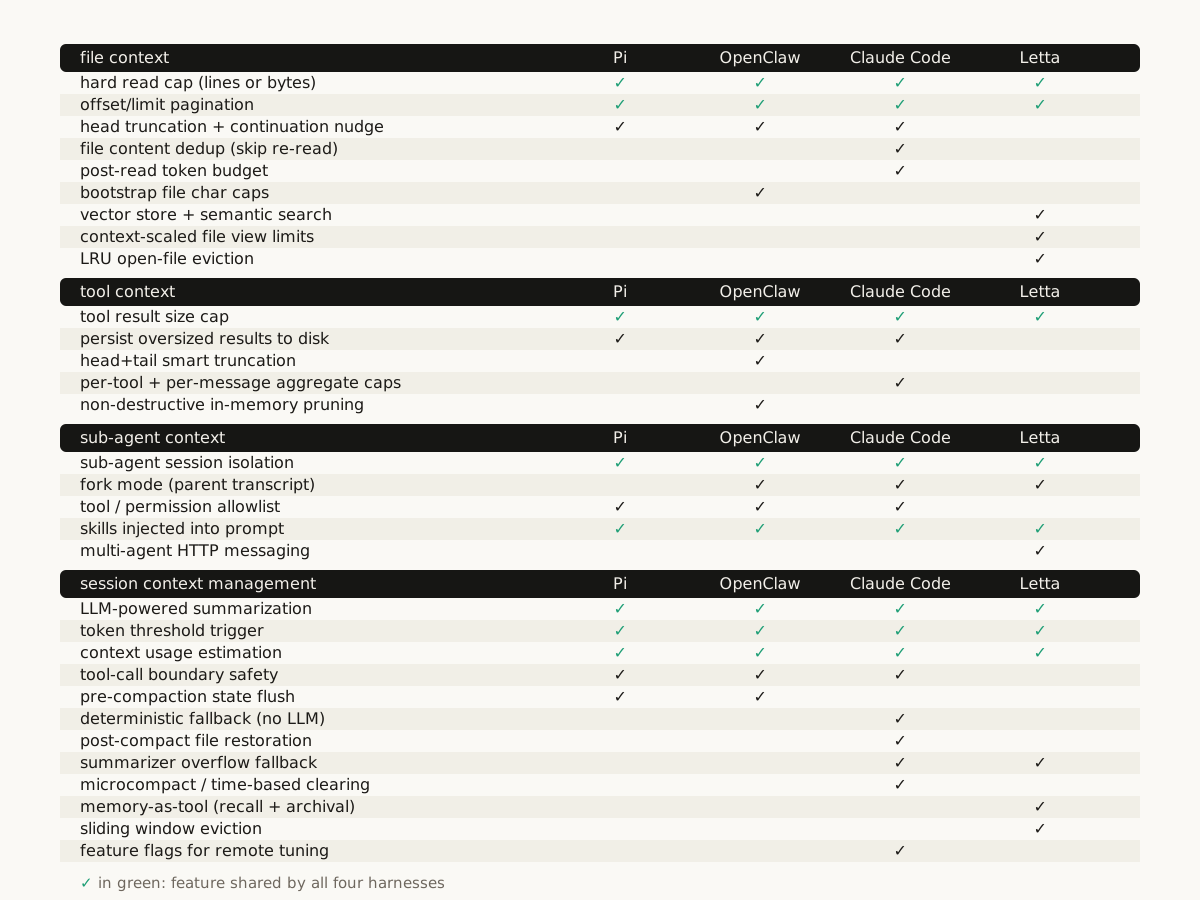
Long sessions add a deeper problem: deciding what old history still matters. When context pressure crosses a threshold, the harness keeps the recent tail of the conversation and summarizes the older transcript into a synthetic message. Each of the four harnesses does this differently. OpenClaw flushes important state to memory before compacting. Claude Code offloads oversized tool results before each call and can restore recently read files after compaction. Letta warns before the window is full, evicts with a sliding window, and falls back to stronger truncation if the summary itself overflows. Compaction done badly can quietly ruin a session, so I wrote a separate deep dive on how each harness triggers, summarizes, and recovers.
Sub-agents are isolated processes
You might expect a child agent to inherit the parent’s conversation, but that would double the context problem instead of solving it, and most harnesses refuse to do it. Pi starts a fresh process with just the task string. OpenClaw starts a fresh session and passes only filtered workspace context. Claude Code’s typed agents start blank: the delegated prompt becomes the first user message, with restricted tools and permissions. Letta mostly avoids forking and keeps execution inside the main loop, with history reachable through recall and archival tools. Sub-agents are closer to isolated processes than shared threads. They get the task, the permissions, and the workspace slice they need, not the parent’s whole mental state. I cover the pattern properly in the sub-agents essay.
The same moves keep showing up
None of this is a coding-agent quirk. A data exploration agent hits the same wall with tables, traces, JSON, notebooks, and charts. Arize’s Alyx converged on near-identical answers: cap tool results, binary-search for the largest slice that fits, deduplicate repeated previews, keep full payloads server-side, expose drill-down tools, and force checkpoints when token pressure climbs. Cursor, Aider, Continue, LangGraph, and OpenAI’s Agents SDK all point in the same direction.
Bigger windows don’t dissolve the problem either. Lost in the Middle showed that models use information at the start and end of a long context far better than information buried in the middle. Chroma’s Context Rot report measured 18 models getting less reliable as input grows, even on simple tasks. Putting more tokens in the window doesn’t guarantee the model uses them well, so the management problem stays.
The mental model is virtual memory
The best frame for all of this isn’t prompt engineering. It’s virtual memory:
- The prompt is registers and cache: what the model needs right now.
- Recent conversation is RAM.
- Summaries are compressed pages.
- Files, vector stores, databases, logs, and tool artifacts are disk.
- Grep, semantic search, offsets, limits, and recall tools are page lookup.
- Compaction is garbage collection.
- Sub-agent isolation is process management.
This analogy isn’t new. The MemGPT paper, the research behind Letta, proposed exactly this in 2023: manage memory tiers inside and outside the window the way an operating system moves pages between RAM and disk. What’s changed since then is that every serious harness now implements some version of it.
The agent that got dumber after one big file read didn’t have a model problem. It had a paging problem. The agent looks like one continuous intelligence, and underneath, the harness is constantly moving memory around to keep that illusion alive.
Where this fits
The future of agents isn’t just better models with bigger windows. It’s harnesses that make a fixed-size working set feel infinite. They cap, slice, search, store, summarize, restore, and isolate, and the model sees the right working set at the right time. The research evidence keeps finding that the harness drives more of an agent’s performance than the model. Context management is a large part of where that gap comes from.
Sources
- Lost in the Middle: How Language Models Use Long Contexts, Liu et al., 2023
- Context Rot: How Increasing Input Tokens Impacts LLM Performance, Chroma research, 2025
- MemGPT: Towards LLMs as Operating Systems, Packer et al., 2023, the paper behind Letta
- Effective context engineering for AI agents, Anthropic
- What is an agent harness? The nine components of a great one, the companion essay this post deepens
- Harness engineering: why agent performance now lives outside the model, the research evidence